CNC · Software

VitalCNC

VitalCNC is CNC control software that runs router tables for laser, plasma and woodworking, as well as mills and lathes. Customize your operator screens, script machine operations in Lua, and ship each machine with a profile that is set up exactly for it.

Windows 10 / 1164-bit
HiCONEthernet and EtherCAT controllers
Free demo20-minute sessions, no license needed
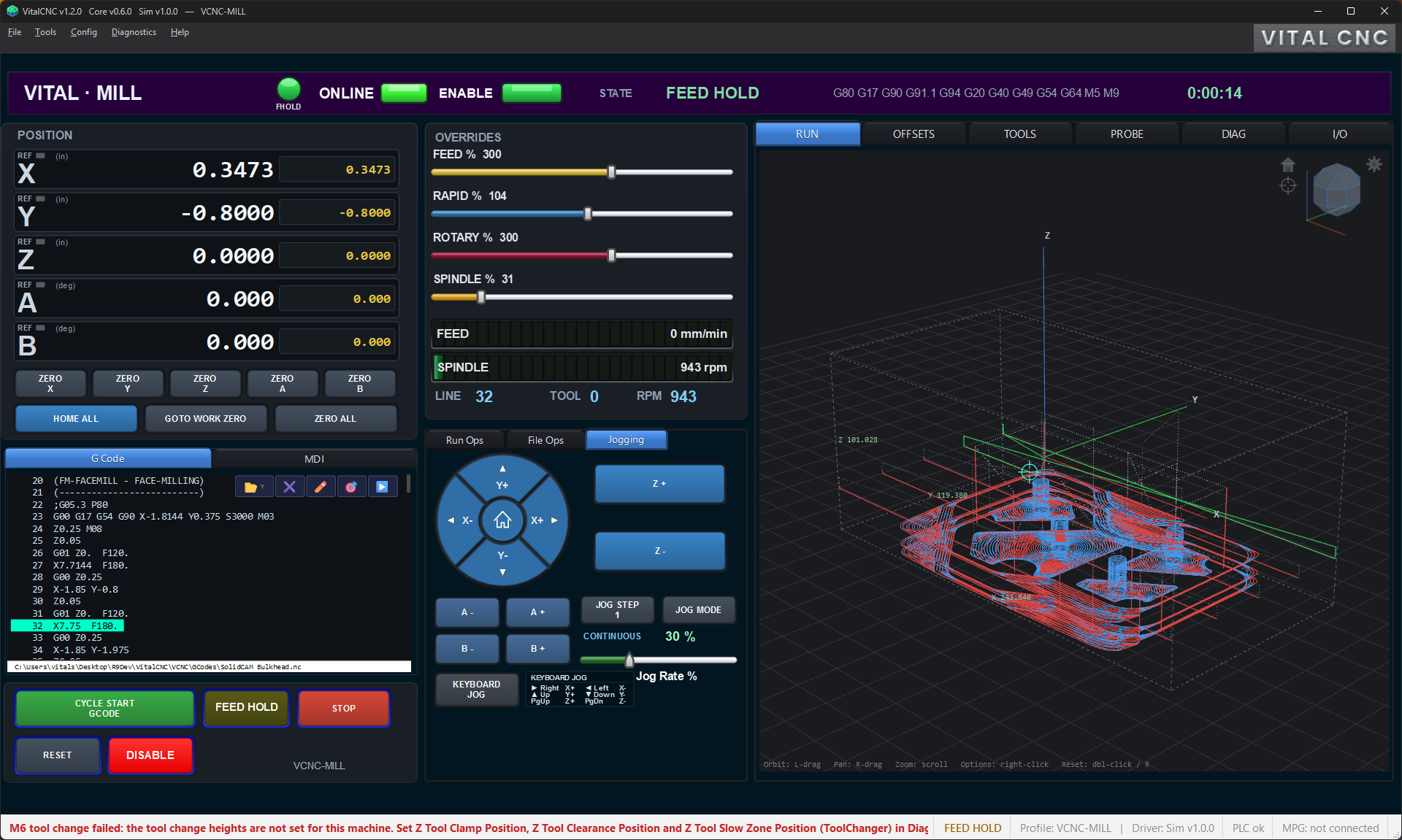
The VitalCNC mill screen running a pocketing program, with its 3D toolpath

Key features

Smooth motion

A look-ahead planner keeps your machine's speed intact. Motion is computed ahead and buffered on the controller, so a busy PC does not affect the machine's performance.

Precise corner control

Rounding at corners never goes past the tolerance you set. Sharper corners can be achieved with G61 or G64 P0.

Customizable screens

Design Mode lets you drag in buttons, position displays, DROs, LEDs, jog pads, G-code lists, a 3D toolpath and tabbed pages to get critical information at a glance.

Lua macros and debugger

Customizable Lua M-codes. The built-in editor supports breakpoints and step-through, and scripts can be locked before a machine ships.

AI code suggestions

The Lua editor suggests the next line or block as you type, using VitalCNC's API. You review every suggestion before you accept it.

Built-in PLC

A Lua scan runs beside the machine for interlocks, lamps and counters. It can be edited and reloaded without restarting the control.

Probing

Set Z from a touch plate, find X and Y edges, or measure a surface with one button. The probe tip size and offset are allowed for, and nothing runs until they are set.

Automatic tool change

A ready-made rack tool-changer M6 that can easily be adapted to your machine.

Return and resume

Cut interrupted in the middle of a job? Simply go back near where it stopped and carry on.

The G-code your CAM writes

Standard RS-274 and Fanuc-style macro programs, canned drilling and tapping cycles, nine work offsets, subprograms, and inch or metric.

Rigid tapping and threading

With an encoder on the spindle, the controller taps without a floating holder and cuts threads in step with the spindle: G84, G84.2 and G74 taps, G33 and G32 threads, and the lathe G76 cycle in both Fanuc and Haas forms.

Spindle on any drive

A VFD on the 0–10 V output, an EtherCAT spindle drive, or a stepper or step and direction servo as a Digital Spindle: M3, M4, M5 and S run all of them the same way. A digital spindle ramps at its motor's own acceleration and needs no analog output at all. How to set one up

Diagnostics on screen

See every input and output live, read controller and EtherCAT status, and watch the values your scripts publish.

Pendant and keyboard jog

Jog from the screen, the keyboard or a USB MPG pendant, in steps or continuous, with a jog-rate override. Hold Shift with a jog key for a rapid.

Integrate with your own software

The VitalCNC SDK lets your own program drive the machine with the same motion control, one machine or several at once. More

A closer look

Every screen below is part of the default mill profile. Each one can be changed in Design Mode to suit your machine. Click a picture to see it full size.

Load it, see it, run it

Open a program and the toolpath appears in 3D, along with the axis controls.

  • Navigate the toolpath in 3D: orbit, pan and zoom, or snap to the top, front, side or iso views.
  • Segment highlighting: click a line in the toolpath to go straight to its G-code line, and the other way round.
  • Overrides for feed, rapid, rotary and spindle, live while cutting.
  • Single block, optional stop and block skip levels.
  • Jog by step or continuously, with the buttons on screen, the keyboard or a pendant.

Single-button probing

Each probe move makes a fast touch, backs off, then makes a slow touch for the reading. The probe then returns to where it started.

  • Z touch plate sets Z zero on the work, adjusted for the plate thickness.
  • X and Y edges account for the tip diameter and its offset from the spindle.
  • Safe to start: a probe searches only within its search distance, and stops if it doesn't find a touch.
  • Corner, pocket, boss and angle cycles are coming soon.

Live I/O display and troubleshooting

The I/O page shows machine inputs, home and limit switches for each axis, general inputs and outputs, and analog channels, all updating in real time.

  • Live display of all I/O and their states.
  • Fully customizable signal and pin mapping.
  • M-code support for manual and conditional output control.

Design your own screens

The display is fully customizable. In Design Mode, drag buttons, position displays, LEDs, bars, sliders and G-code views in from the Toolbox to show critical information.

  • Snap to grid, align and distribute: line objects up with each other and space them evenly, with full Undo.
  • Reuse templates across the display, so a layout is built once.
  • Properties panel for the selected object: size and position, caption, colours, and what it does when pressed, from a G-code line to a macro or a Lua function.

Make the machine yours

Tool changers, probing routines, interlocks and custom buttons are all Lua scripts in the machine profile, so you can read them, change them and add your own.

  • AI suggestions: the editor offers the next line or block as you type. Accept it or keep typing.
  • Debugger with breakpoints, step in, step over and a live view of variables.
  • Macros take P, Q, R and L words from G-code, like a built-in M-code.
  • Protect your IP: ship machines without revealing the source of your screens and scripts.

When something is wrong, it says what

Controller link, EtherCAT devices, buffer level and firmware version are on screen. Errors are written in plain words and kept in the machine log.

  • New-machine checklist installed with each profile, so commissioning steps are not missed.
  • Controller firmware check on connect.

See every millisecond of every move

MotionScope records motor data, inputs and outputs at high speed and plots them on one timeline, so you can tune a drive or track down a fault from what the machine actually did.

  • Motor data: command, actual and following error for up to three motors, for precise tuning.
  • Inputs, outputs and signals on the same timeline as the motion, so you can see exactly how your machine is operating.
  • Free run or trigger: capture the data at the moment that matters.
  • X-Y view draws the path the machine really took.
  • PID tuning for analog servo drives: run a test move and see command, feedback, and following error all together in one view.

See it run

Short clips of VitalCNC on real machines.

Video coming soonVitalCNC in two minutes
VitalCNC in two minutesLoad a program, preview it, run it on a mill.
Video coming soonProbing
ProbingZ touch-off on a plate, then finding an X edge.
Video coming soonAutomatic tool change
Automatic tool changeA rack changer swapping tools mid-program.
Video coming soonDesigning a screen
Designing a screenF4, drag in a button, link it to a macro, run it.
Video coming soonReturn and resume
Return and resumeCut interrupted? No worries: jog clear, go back and finish the part.
Video coming soonAI code suggestions
AI code suggestionsThe Lua editor suggests the next line or block as you type, from a model that knows VitalCNC's API. It runs on your PC, with no cloud service or subscription. You review every suggestion before you accept it.

The V31 controller

VitalCNC runs your machine through a Vital Systems controller. The V31 is a factory-ready board that drives step and direction motors and EtherCAT drives side by side.

High performance, ready for the factory

One board covers the wiring of a typical mill, router, plasma or laser table, and EtherCAT adds drives and I/O as the machine grows.

  • Up to 12 axes: 6 step and direction motor outputs, with EtherCAT drives alongside.
  • EtherCAT for up to 30 drives and I/O modules.
  • 16 inputs and 8 outputs, 24 V industrial wiring, 500 mA per output.
  • Spindle: 0–10 V speed output, forward and reverse relays, and an encoder input.
  • Safety: E-stop input and two drive-enable relays.
  • Ethernet to the PC, powered from 24 V DC.

Getting started with VitalCNC

Compatible Hardware

  • Vital Systems Controller Such as the V31
  • Windows 10 or 11 PC with a network port for the controller
  • Drive sets that take either Step/Direction, 0-10V (DSPMC), or EtherCAT command as input
  • Spindle with 0–10V, EtherCAT, or a step and direction drive as a Digital Spindle
  • Vital Systems I/O Expansion boards, USB or wireless MPG pendants, and more

Getting started

  • Start from a ready-made mill profile and adjust it to your machine
  • Follow the new-machine checklist, which opens when installation finishes
  • Try it free: without a license, VitalCNC runs in 20-minute sessions

CNC machines are dangerous. Commission every machine with care.

Integrate with your own software

Integrate VitalCNC and the V31 controller with your own software. Your program is the front end, and the VitalCNC SDK puts VitalCNC's motion control behind it.

How it works

  • Your program sends G-code, all at once or while the machine is already moving
  • The SDK plans the motion and streams it to the V31, blending moves at full speed
  • Your program reads back position, the line being cut and the machine state, for its own progress display
  • Several machines at once: one PC application can control several machines, each with its own V31

What's in the package

  • A C API in one header, used directly from C++ or any Windows compiler
  • A Visual Studio 2022 solution with samples, including a starter controller DLL
  • A simulator, so the software is written and tested before the machine is built
  • The same machine config as VitalCNC: a machine tuned in VitalCNC runs the same from your program

Downloads

Install VitalCNC and try it on your machine. Without a license it runs in 20-minute sessions. license keys come with the purchase of a board.

Get VitalCNC

Talk to us about your machine, or read the machine builder's manual first.